Guide
Why Google Analytics Misses AI Traffic (and How to Catch It)
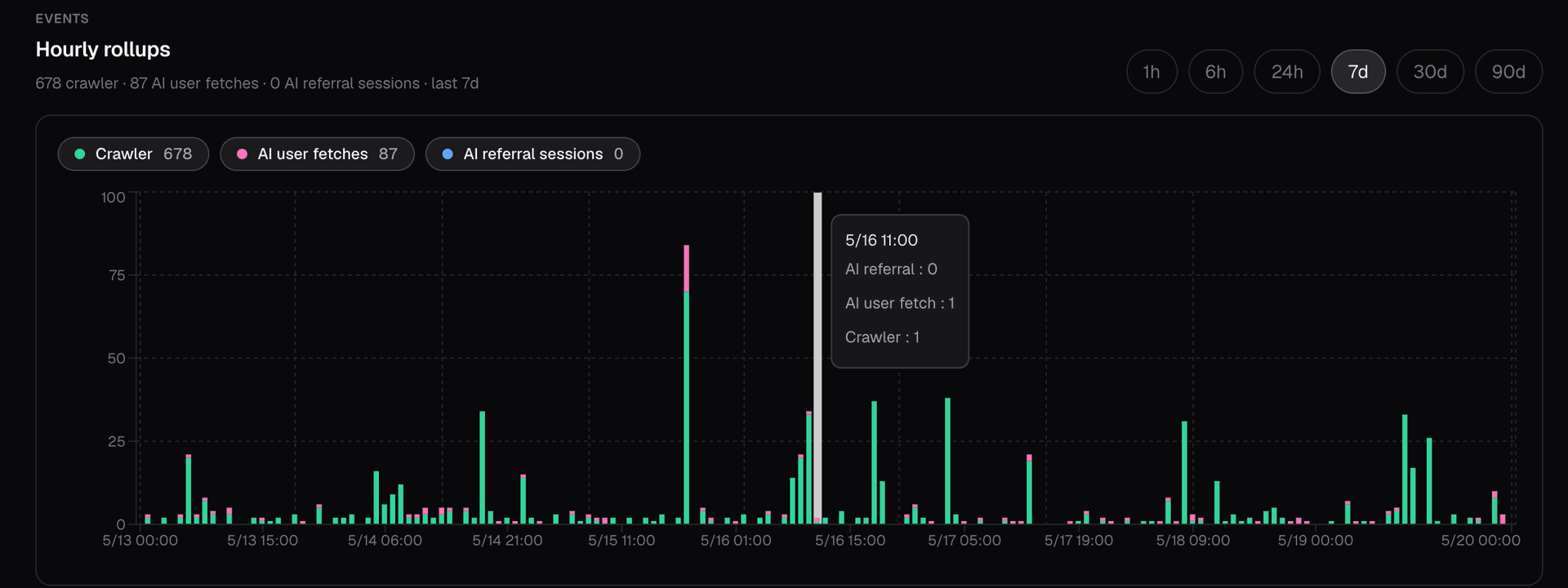
Your Analytics Can't See AI Traffic. Your Server Logs Can.
Imagine ChatGPT fetched dozens of pages from your site this week to answer real users, and GPTBot crawled hundreds more to train its next model. Now open Google Analytics. You will see none of it. Not an undercount. Zero.
This is not a setting you forgot to flip. It is how browser-based analytics works, and it means the fastest-growing slice of your traffic is invisible in the dashboard you check every day. Here is why, and how to see AI traffic using data you already have.
Why your analytics misses it
Google Analytics is a JavaScript tag. It only records a visit when a real browser loads your page and executes that script.
AI crawlers and assistants do not run a browser. They send a plain HTTP request to your server, read the HTML response, and leave. There is no JavaScript engine anywhere in that flow, so the tag never fires and the visit is never counted.
There is no setting that fixes this. GA measures browsers, and a bot is not a browser. Worse, it quietly drops traffic it flags as a bot before it ever builds your report, and it will not tell you how much it removed.
The data is already in your server logs
Every request that reaches your site, human or bot, gets written to your server access logs. Each line carries a user-agent, a source IP, a path, and a status code.
That is everything you need. No pixel, no cookie banner, no client-side script. The raw evidence is already on disk. The real work is classifying it.
Step one: match the user-agent
Start by matching the user-agent string against known AI bots: GPTBot, ClaudeBot, OAI-SearchBot, PerplexityBot, ChatGPT-User, and so on.
On its own, this proves nothing. The user-agent is just a string the caller chooses to send. I can send your site a request that says "GPTBot" right now, and so can any scraper. A name match is a claim, not a fact.
Step two: verify with the IP
To turn that claim into a fact, check the request's source IP against the IP ranges most operators publish.

Now you have a real test. The user-agent claims an identity, and the source IP either backs it up or it does not. If the IP falls inside the operator's published range, it is a verified bot. If the user-agent says GPTBot but the IP belongs to some unrelated host, treat it as unverified, and most likely a spoof. Count the two separately, because they mean very different things.
Three kinds of AI traffic
Even once a bot is verified, "AI traffic" is not a single number. It splits into three kinds, and each one answers a different question.
Bulk crawl. GPTBot, ClaudeBot, Googlebot and others pulling pages in volume to index or train on. This is background machine activity, not tied to any single person. It tells you whether AI systems know your content exists at all. No crawl, no chance of ever being cited.
Live user fetch. ChatGPT-User, Claude-User, Perplexity-User fetching one page, right now, because a real person just asked the assistant a question and it needs your content to answer. It tells you AI is reading your page on demand. That is live demand.
Referral. No bot at all. A person read an AI answer, clicked a link inside it, and landed on your site. You catch it from the Referer header or a utm_source tag such as chatgpt.com or perplexity.ai. It tells you AI sent you a real visitor.
The full picture
Line the three up and you see the whole path a piece of content travels:
- Crawl: AI learns your page exists.
- Live fetch: AI reads it to answer someone.
- Referral: that someone clicks through to you.
Your server logs capture all three. A JavaScript tag captures, at best, the last one, and only when the referrer survives the click. Everything upstream of that final hop, the part that decides whether AI ever mentions you at all, never reaches the dashboard.
References
Every operator documents its bots, and most publish the exact IP ranges those bots run from. Verify against these primary sources, not third-party aggregators.
OpenAI: GPTBot, OAI-SearchBot, ChatGPT-User
- Bots overview
- IP ranges: gptbot.json, searchbot.json, chatgpt-user.json
Google: Googlebot, plus the user-triggered fetchers
- Crawlers overview
- IP ranges: googlebot.json, user-triggered-fetchers.json
Perplexity: PerplexityBot, Perplexity-User
- Perplexity crawler documentation (the perplexitybot.json and perplexity-user.json IP files are linked from this page)
Anthropic: ClaudeBot, Claude-User, Claude-SearchBot
- Anthropic crawler documentation
- Anthropic is the exception: it documents its bots but does not publish a machine-readable IP-range file. Verify those by reverse DNS, confirmed with a forward lookup back to the same IP.
You can catch this today
None of this needs new instrumentation. It is your own server logs, parsed, verified against published IP ranges, and split by intent. You can build that pipeline yourself.
Or you can use Canonry. We spent a lot of time and thought building this out, and as far as we know, it is the only open source tool that does it. It supports Vercel, WordPress, and Google Cloud Run out of the box: github.com/AINYC/canonry.
FAQ
Can Google Analytics see AI bot traffic from GPTBot, ChatGPT, or Claude?
No. Google Analytics is a JavaScript tag that only fires when a real browser loads your page and executes the tag. AI crawlers and assistants like GPTBot, ChatGPT-User, and ClaudeBot send plain HTTP requests without running a browser, so the tag never executes and the visit is never recorded. GA also drops requests it flags as bots before they reach your report, without telling you how much it removed.
How do I verify that a request is actually from ChatGPT or GPTBot and not a spoofer?
Check the request's source IP against the IP ranges most operators publish. OpenAI, Google, and Perplexity publish machine-readable IP-range files. Anthropic is the exception: it documents its bots but does not publish such a file, so verify Claude bots by reverse DNS confirmed with a forward lookup back to the same IP. If the user-agent claims GPTBot and the source IP falls inside OpenAI's published range, the request is a verified bot. If the user-agent says GPTBot but the IP belongs to an unrelated host, treat it as unverified and most likely a spoof. Count verified and unverified hits separately because they mean very different things.
What is the difference between an AI crawler and an AI user fetch?
An AI crawler (like GPTBot or ClaudeBot) pulls pages in volume to index or train models. It is background machine activity, not tied to any single person, and tells you whether AI systems know your content exists. An AI user fetch (like ChatGPT-User, Claude-User, or Perplexity-User) is a single page request triggered right now because a real person asked the assistant a question that needs your content to answer. It is live demand.
Do I need to install anything to track AI traffic on my site?
No. Every request to your site, human or bot, is already written to your server access logs. Each line carries a user-agent, a source IP, a path, and a status code. The data is already on disk. The work is parsing the user-agent, verifying the source IP against published AI operator IP ranges, and classifying the request by intent (crawl, user fetch, or referral).
What is an AI referral and how is it different from a crawler or user-fetch hit?
A referral is a real human visitor who read an AI answer, clicked a link inside it, and landed on your site. There is no bot involved. You detect it from the Referer header or a utm_source tag such as chatgpt.com or perplexity.ai. Crawler hits and user fetches are machine activity reading your page; referrals are people that AI sent to you. All three are distinct kinds of AI traffic and answer different questions.
Try it yourself.
Run a free AEO audit to see how your site scores, or explore the tools and pages referenced in this article.