Research
Claude Appends the Current Year to Some Web Searches
Quick research note. When Claude runs a web search to answer certain queries, it rewrites the search string to include the current year, even when the user did not type one.
We sampled subqueries across categories and inspected the search strings Claude actually issued. The pattern was consistent enough to act on.
The pattern
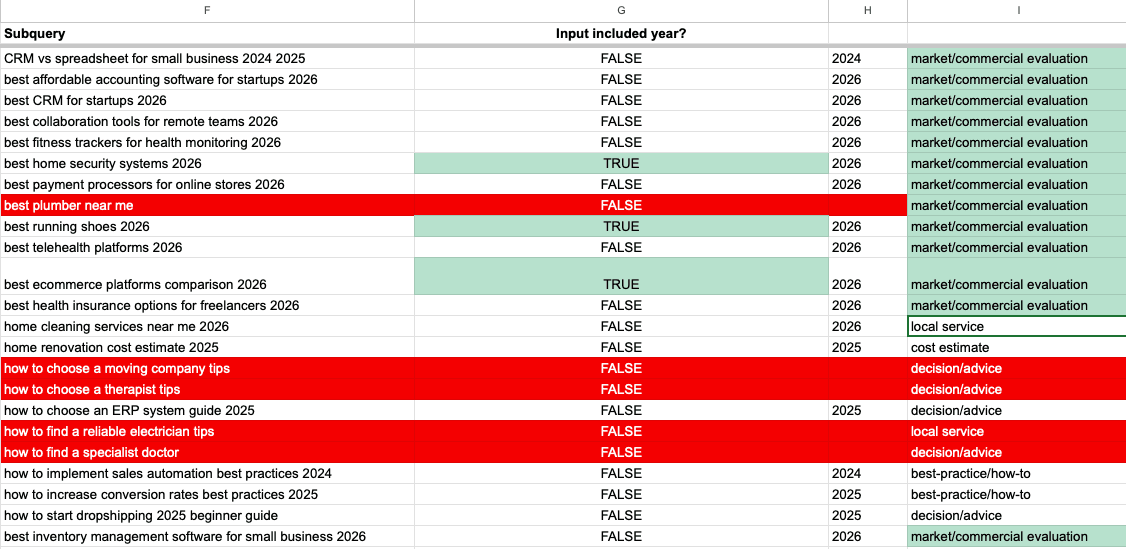
Year gets appended for commercial and "best X" comparison queries:
- "best CRM for startups" becomes "best CRM for startups 2026"
- "best collaboration tools for remote teams" becomes "best collaboration tools for remote teams 2026"
- "best running shoes" becomes "best running shoes 2026"
Year does not get appended for:
- Advice and decision queries ("how to choose a therapist", "how to find a specialist doctor")
- Local service queries ("best plumber near me", "home cleaning services near me")
- Cost estimate queries ("home renovation cost estimate")
Roughly: if the answer is meant to be evergreen advice, no year. If the answer is a list that should be current, the year goes in.
What this means for your content
If you publish a "best X" or comparison page and the page itself only references last year (or no year at all), Claude's actual search has "2026" in it. A page that mentions 2026 in its title, headings, and schema is a better match than one that does not.
For evergreen advice pages, the opposite holds. Stamping "(2026)" on a how-to article does nothing for Claude's search because Claude is not searching with a year on those queries. It can also age the page in users' eyes faster than necessary.
Practical takeaway
- For commercial, comparison, and "best X" pages: put the current year in the H1, in section headings, and in
dateModifiedon Article or BlogPosting JSON-LD. Refresh on a real cadence so the date is honest. - For advice, how-to, local service, and cost-estimate pages: leave the year out of the title. Use
dateModifiedfor trust, but do not stuff a year into the H1. - Audit your corpus by category. Apply the year treatment where the retrieval layer is actually searching with one, not everywhere.
The retrieval layer is doing more query rewriting than most content strategy assumes. The cheapest signal you can give it is matching the query it is actually running.
FAQ
Does Claude always add the year to web searches?
No. In our sample, Claude added the current year mostly to commercial and 'best X' comparison queries. It did not add a year to how-to, advice, local service, or cost-estimate queries.
Should I put the year in every page title?
No. Year-stamping helps for pages where Claude (and similar retrieval layers) actually search with a year, which is mostly commercial comparison content. For evergreen advice and how-to pages, putting the year in the H1 mostly ages the page in users' eyes without any retrieval benefit.
How often should I refresh year-stamped content?
On a real cadence. If your page says '2026' in the H1, the body, schema, and dateModified should reflect a recent update. A title that claims 'best X 2026' on top of 2024 content is a worse match than a page that does not claim a year at all.
Try it yourself.
Run a free AEO audit to see how your site scores, or explore the tools and pages referenced in this article.